
Porchday: Delivery Dates
Tell shoppers when it'll be on their porch.
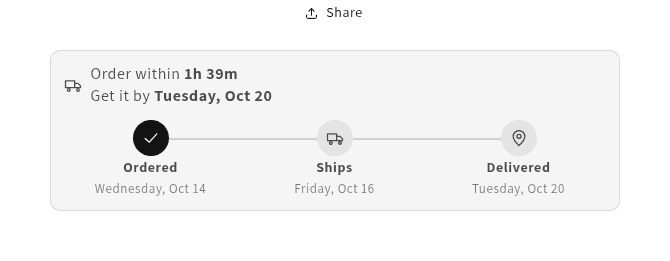
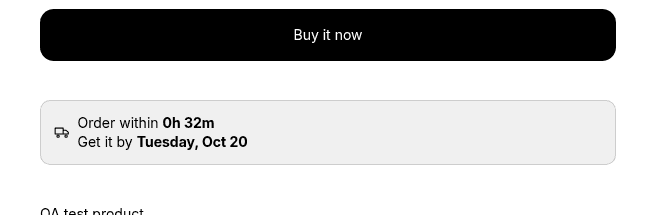
Porchday puts an estimated delivery date on your product pages. It's worked out from your order cutoff, processing time, weekends, holidays, and shipping time, so the date you show is one you can keep.
Free plan. Paid plans from $9 a month, with a 14-day free trial. Billed through Shopify.
Setup
Up and running in a few minutes
Set your promise
Your cutoff time, how long orders take to pack, and how long shipping takes.
Add the block
Drop it into your product page in the theme editor, usually just under Add to cart.
Pick a look
Choose a template, match your colors, and edit the wording.
Beyond the product page
The same date, from the product page to the order.
On Starter and up, the date follows shoppers into the cart and cart drawer. On Pro and Max it also shows on the thank-you and order status pages.
Stores on Shopify Plus can also show it in the checkout step. Slower products, preorders, and different countries can each have their own rules. Dates are country-level.
Pricing
Start free, upgrade when you need more
Monthly plans billed through Shopify. Paid plans come with a 14-day free trial, once per store.
Free
Free
- Product page delivery date with countdown
- Default promise, cutoff, weekends, and manual holidays
- Up to 25 products
- 1 design template
Starter
$9/mo
- Everything in Free
- Unlimited products
- All design templates
- Cart and cart drawer
- Automatic holiday calendars
- Product, collection, tag, and variant rules
- Country-level dates
- Basic analytics
Pro
$19/mo
- Everything in Starter
- In-stock, out-of-stock, and preorder dates
- Date at checkout (Shopify Plus stores)
- Date on thank-you and order status pages
- 2 warehouses
- Accuracy summary
Max
$29/mo
- Everything in Pro
- Unlimited warehouses
- Full accuracy report with CSV
Questions
Common questions
Where does the date show up?
On the product page on every plan. Starter adds the cart and cart drawer. Pro and Max also show it on the thank-you and order status pages, and in the checkout step if your store is on Shopify Plus.
How is the date worked out?
From your rules: processing time, your daily order cutoff, weekends, holidays, and shipping time. On Starter and up you can give products, collections, tags, or countries their own promise.
Will it match my theme?
It's a theme app block, so you add it in the theme editor and place it where you like, usually just under Add to cart. Pick a template, then adjust the colors and text.
Does it collect my customers' personal details?
No names, emails, phone numbers, or street addresses. Dates are country-level: Porchday uses only the shopper's country, never a ZIP or postal code.
How does billing work?
Through your Shopify bill. Paid plans are monthly, with a 14-day free trial once per store. Change or cancel your plan in the app at any time.